Search Amazon By Price Range
Find Amazon Products Within Your Budget
Looking for a simple way to search Amazon by price range? You're in the right place. This page lets you search for any product sold on Amazon, choose your own minimum and maximum prices and generate a custom Amazon search link based on your preferences.
Whether you're shopping for yourself, buying a gift, comparing products or simply trying to stay within a budget, searching by price can save time and help you find products that fit your needs.
Unlike a standard Amazon search, you decide the price range before you start browsing. Simply enter the name of the product you're looking for, choose the lowest and highest price you're willing to pay, select your preferred sort order, and generate your custom Amazon search link. Click the generated link to open Amazon and view products matching your search and budget.
This search works for any type of product available on Amazon, including electronics, clothing, tools, kitchen items, home improvement products, toys, office supplies, beauty products, pet supplies, automotive accessories, sports equipment, books, and much more. If Amazon sells it, you can search for it.
Searching by price range is especially useful when you already know how much you want to spend. Instead of scrolling through hundreds of products that are too expensive or far below the quality you're looking for, you can focus on products that fall within your budget from the start. It's also a convenient way to compare products in the same price range before making a purchase.
Try different price ranges to discover more options. A small change to your minimum or maximum price can reveal additional products, better brands, or higher-rated items that you might otherwise miss. Whether you're looking for the lowest price, the best value, or simply browsing within a specific budget, this search makes it faster and easier to find what you're looking for on Amazon.
Table of Contents
- Find Amazon Products Within Your Budget (above)
- How to Search Amazon by Price (below)
- Why Search Amazon by Price Range?
- Search Amazon Using Your Own Minimum and Maximum Prices
- Search Amazon Smarter
- When Is an Amazon Price Range Search Most Useful?
- Why Use This Amazon Price Search Instead of Standard Amazon Filters?
- Popular Amazon Searches to Try
- Choose the Right Price Range for Better Results
- Get More from Your Amazon Searches
- Search More Precisely to Find Better Products
- How to Find the Best Value, Not Just the Lowest Price
- Frequently Asked Questions About Searching Amazon by Price
- Start Your Amazon Price Search
Why Search Amazon By Price Range?
Shopping with a budget in mind makes it easier to find products that meet both your needs and your spending limit. Instead of browsing countless items across every price point, you can focus on products that fall within the price range you choose.
Whether you're looking for the lowest price, comparing products in a specific budget, buying a gift, or simply trying to avoid overspending, searching Amazon by price range can help you find more relevant results faster. It also makes it easier to compare products with similar features, ratings, and prices before making a purchase.
You can search for any product sold on Amazon by entering its name, choosing your minimum price and maximum price, and a click will generate a custom Amazon search link. If your first search doesn't produce exactly what you're looking for, simply return to this page, adjust your product name or price range, and generate another search in seconds.
Search Amazon Using Your Own Minimum and Maximum Prices
One of the biggest advantages of this custom Amazon search is that you can choose your own minimum and maximum prices before opening Amazon. Simply enter the name of the product you're looking for, select your preferred price range, and generate a custom Amazon search link right away.
You can search for any product sold on Amazon. Whether you're looking for electronics, wireless earbuds, headphones, phone cases, tools, kitchen appliances, clothing, shoes, books, pet supplies, automotive accessories, beauty products, sports equipment, home décor, furniture, or countless other items, if Amazon sells it, you can search for it.
You can also search using brands, models, sizes, colors, or other keywords. For example, instead of searching for headphones, you could search for Sony wireless headphones, men's running shoes size 10, stainless steel coffee mug, or cordless drill. Combining a specific product name with your own minimum and maximum prices usually produces more relevant Amazon search results.
If your first search returns too many or too few products, simply adjust the product name or change your minimum and maximum prices by a few dollars and generate another Amazon search link. Small changes often reveal additional products, brands, sizes, colors, or features while keeping your search within your budget.
Whether you're looking for the lowest price, comparing products in a specific budget, shopping for gifts, replacing an item, or simply exploring your options, creating a custom Amazon search with your own minimum and maximum prices makes it easier to focus on products that match both your needs and your budget.
Frequently Asked Questions About Searching Amazon by Price
Can I search Amazon by a specific price range?
Yes. Enter the product you want to find, choose your own minimum and maximum prices, generate your custom Amazon search link and open it to view matching Amazon products within your selected price range.
Can I search for any product sold on Amazon?
Yes. If Amazon sells it, you can search for it. Simply enter the product name or keywords, choose your price range and generate your custom Amazon search.
Can I search by brand instead of just product name?
Yes. You can search for brands, models, sizes, colors, and other keywords. For example, you could search for Apple AirPods, DeWalt drill, Nike running shoes, stainless steel water bottle or any other product sold on Amazon.
What happens if I don't find exactly what I'm looking for?
Try changing your keywords or adjusting your minimum and maximum prices. Even a small change in your search terms or price range can produce different results and help you discover more products.
Does this search open Amazon?
Yes. After you generate your custom Amazon search link and click it, Amazon opens in a new browser tab with the search and price range you've selected.
Can I generate another Amazon search?
Absolutely. Return to this page at any time, change the product name, price range, or sort order and generate another custom Amazon search link in just a few seconds.
Search Amazon Smarter
Finding the right product isn't always about choosing the lowest price. A better search starts with the right keywords and a realistic budget. The more specific your search, the more relevant your Amazon results are likely to be.
Instead of searching for a broad term such as "headphones", try searching for "wireless earbuds", "noise cancelling headphones" or a specific brand and model. You can also include details such as color, size, material, capacity or other features to narrow your results even further.
Your price range also plays an important role. If you don't find exactly what you're looking for, don't give up after the first search. Try increasing your maximum price slightly or lowering your minimum price by a few dollars. Even small adjustments can reveal additional products that may better match your needs, preferences, or budget.
When comparing products, don't focus only on price. Consider customer ratings, the number of reviews, product features, warranty information, shipping options, and delivery times. Spending a little more can sometimes provide significantly better value while reducing your maximum price may help you discover excellent budget-friendly alternatives.
One of the biggest advantages of this custom Amazon search is that you can quickly generate multiple searches using different products, keywords, brands, or price ranges. Experimenting with several searches often helps you compare more products, discover better deals and make a more informed buying decision before you purchase.
Why Use This Custom Amazon Price Search Instead of Standard Amazon Filters?
Amazon offers many ways to browse products but sometimes you already know exactly what you want and how much you want to spend. This custom Amazon price search lets you enter any product, choose your own minimum and maximum prices, and generate a search that takes you directly to matching Amazon results.
Instead of manually changing filters after every search, you can quickly create different searches using different products, price ranges, or sort options. This makes it easy to compare several budgets before deciding which products offer the best value.
For example, you might search for wireless earbuds between $24 and $33, then compare the results with a search between $34 and $45. You can do the same for power tools, kitchen appliances, clothing, electronics, pet supplies, automotive accessories, books, toys and virtually any other product sold on Amazon.
Another advantage is flexibility. If your first search doesn't produce exactly what you're looking for, simply return to this page, adjust the product name, minimum price, maximum price, or sort order and generate another custom Amazon search in seconds. Small changes often reveal different products, additional brands, or better values without starting your search from scratch.
Whether you're shopping for yourself, buying gifts, comparing products, replacing an older item, or researching prices before making a purchase, creating a custom Amazon search gives you greater control over how you browse Amazon products and helps you focus on the price range that works best for you.
Popular Amazon Searches to Try
If you're not sure what to search for first, start with a product you already plan to buy. Almost any item sold on Amazon can be searched using your own minimum and maximum prices, making it easy to compare options within a budget you choose.
Some of the most popular Amazon search categories include electronics such as wireless earbuds, Bluetooth speakers, computer monitors, webcams, keyboards, mice, chargers, and portable power banks. Home and kitchen searches often include coffee makers, air fryers, cookware, vacuum cleaners, storage containers, bedding, lighting and small appliances.
DIY enthusiasts frequently search for cordless drills, impact drivers, tool sets, laser levels, work lights, ladders, pressure washers, shop vacuums, and garage storage solutions. Clothing searches commonly include running shoes, jackets, jeans, backpacks, watches, sunglasses and seasonal apparel.
Parents often search for educational toys, board games, baby products, school supplies, and children's books. Pet owners look for food, treats, beds, toys, leashes, grooming supplies, and training accessories. Automotive shoppers search for dash cameras, floor mats, seat covers, phone mounts, tire inflators, jump starters and car care products.
The best results usually come from using specific search terms instead of broad ones. For example, searching for cordless drill brushless 20V is likely to produce more relevant results than simply searching for drill. Likewise, searching for stainless steel insulated water bottle 32 oz is more precise than searching for water bottle.
Remember that you can experiment with different keywords for the same product. A small change in wording can uncover different brands, product variations, accessories, or bundles that may not appear in another search. Trying several related searches is often the fastest way to discover products that best match your needs and budget.
Choose the Right Price Range for Better Results
Choosing the right price range can make a significant difference in the quality of your search results. A very narrow price range may exclude products that are only a few dollars higher or lower, while a very wide range can return far more products than you want to review.
If you're unsure what a product typically costs, start with a broader price range to get an overview of what's available. After looking at the results, return to this page and narrow your minimum and maximum prices to focus on products that better match your budget and expectations.
For products with many variations, such as headphones, coffee makers, office chairs, or power tools, trying several different price ranges often helps you identify where the best balance of quality, features and value can be found. Comparing searches at different price points can also reveal premium models with additional features or budget-friendly alternatives that still have excellent customer reviews.
Price isn't the only factor worth considering. Before making a purchase, compare product descriptions, specifications, customer ratings, verified reviews, warranty information, shipping options, and return policies. A slightly higher-priced product may provide better durability, longer life or additional features that make it the better overall value.
One of the advantages of using this custom Amazon search is that experimenting takes only a few seconds. You can quickly generate multiple searches using different products, keywords, brands, and price ranges until you find the combination that best fits your needs.
Get More from Your Amazon Searches
Finding the right product is often a process rather than a single search. Different keywords, brands, features, and price ranges can produce very different results, even when you're looking for the same type of item.
For example, someone searching for a coffee maker might discover better options by searching for programmable coffee maker, single-serve coffee maker, stainless steel coffee maker, or coffee maker with grinder. Likewise, someone shopping for a backpack might compare travel backpacks, hiking backpacks, laptop backpacks, or carry-on backpacks within the same budget.
Don't hesitate to try different combinations of keywords and price ranges. You may find products with better features, higher customer ratings, different colors, larger capacities, or bundled accessories that weren't visible in your original search.
This page is designed to make those comparisons quick and simple. Instead of manually rebuilding your search every time, you can generate another custom Amazon search in seconds and continue exploring products until you find the one that best meets your needs, preferences, and budget.
The goal isn't simply to spend less - it's to make a more informed buying decision. Taking a few extra minutes to compare products within different price ranges can help you identify better values, avoid unnecessary spending, and choose products you'll be happier with long after your purchase arrives.
Search More Precisely to Find Better Products
The words you enter into your search can have a major impact on the products Amazon returns. A more specific search often produces more relevant results than using a broad product name.
For example, instead of searching for chair, you could search for ergonomic office chair with lumbar support. Instead of searching for flashlight, try rechargeable LED flashlight. Rather than searching for backpack, search for waterproof hiking backpack or laptop backpack 17 inch. The more accurately you describe what you're looking for, the easier it becomes to compare products that truly match your needs.
You can also include details such as color, material, size, capacity, compatibility, intended use or important features. Searching for stainless steel water bottle 32 oz, USB-C charger 100W, or cordless drill brushless, helps narrow the results to products that are much closer to what you actually want.
If you're comparing several brands, repeat the same search using different brand names while keeping the same price range. This makes it easier to compare similar products without constantly changing your budget.
Combining precise search terms with your own minimum and maximum prices gives you greater control over your Amazon search and often leads to faster, more relevant results than starting with a broad keyword alone.
How to Find the Best Value, Not Just the Lowest Price
Finding the lowest priced product isn't always the best buying decision. While staying within your budget is important, the overall value of a product often depends on much more than its price.
When comparing products in the same price range, take a few moments to review customer ratings, the total number of reviews, product specifications, included accessories, warranty information, and shipping options. A product that costs a few dollars more may include better materials, additional features, a longer warranty, or significantly better customer feedback.
It's also worth comparing several products before making a final decision. Opening a few promising listings in separate browser tabs makes it easier to compare specifications, dimensions, compatibility, photos, and customer experiences without losing track of the products you're considering.
If you're making an expensive purchase, don't rush. Reading both positive and critical reviews can help you understand how a product performs in real-world use. Many shoppers find that spending a little extra on a higher-quality product saves money over time by avoiding replacements, repairs, or disappointment.
Using a custom Amazon search with your own price range helps you focus on products that fit your budget, but taking a few extra minutes to compare those products carefully can help you choose the one that offers the best overall value for your money.
Frequently Asked Questions About Searching Amazon by Price
Can I search Amazon using my own minimum and maximum prices?
Yes. Simply enter the product you're looking for, choose your own minimum and maximum prices, select a sort order, generate your custom Amazon search link and click it to open Amazon with your selected search.
Can I search for any product sold on Amazon?
Yes, if Amazon sells it, you can search for it. Enter any product name, brand, model, feature, size, color, or other keywords to create your custom Amazon search.
Can I search by brand?
Absolutely. You can search for specific brands, product lines or models. For example, instead of searching for coffee maker, you can search for Ninja coffee maker or Cuisinart coffee maker while keeping your preferred price range.
Can I change the price range later?
Yes, you can return to this page at any time, change the minimum price, maximum price, product name, or sort order and generate another Amazon search.
What if my search returns too many products?
Try using more specific keywords or narrow your price range. Adding a brand name, size, color or important feature, usually produces more relevant results.
What if my search returns too few products?
Increase your maximum price slightly, lower your minimum price or use broader search terms. Small adjustments often reveal many more matching products.
Does this page sell products?
No. This page helps you generate a custom Amazon search. All product information, pricing, availability, shipping and purchases are handled by Amazon.
Does opening Amazon replace this page?
No. Amazon opens in a new browser tab, making it easy to return here and generate another custom search whenever you want.
Can I compare different budgets?
Yes. One of the easiest ways to compare products is to run several searches using different price ranges. This helps you see what additional features or brands become available at different price points.
Is this custom Amazon search free to use?
Yes, you can generate as many custom Amazon search links as you like.
Start Your Amazon Price Search
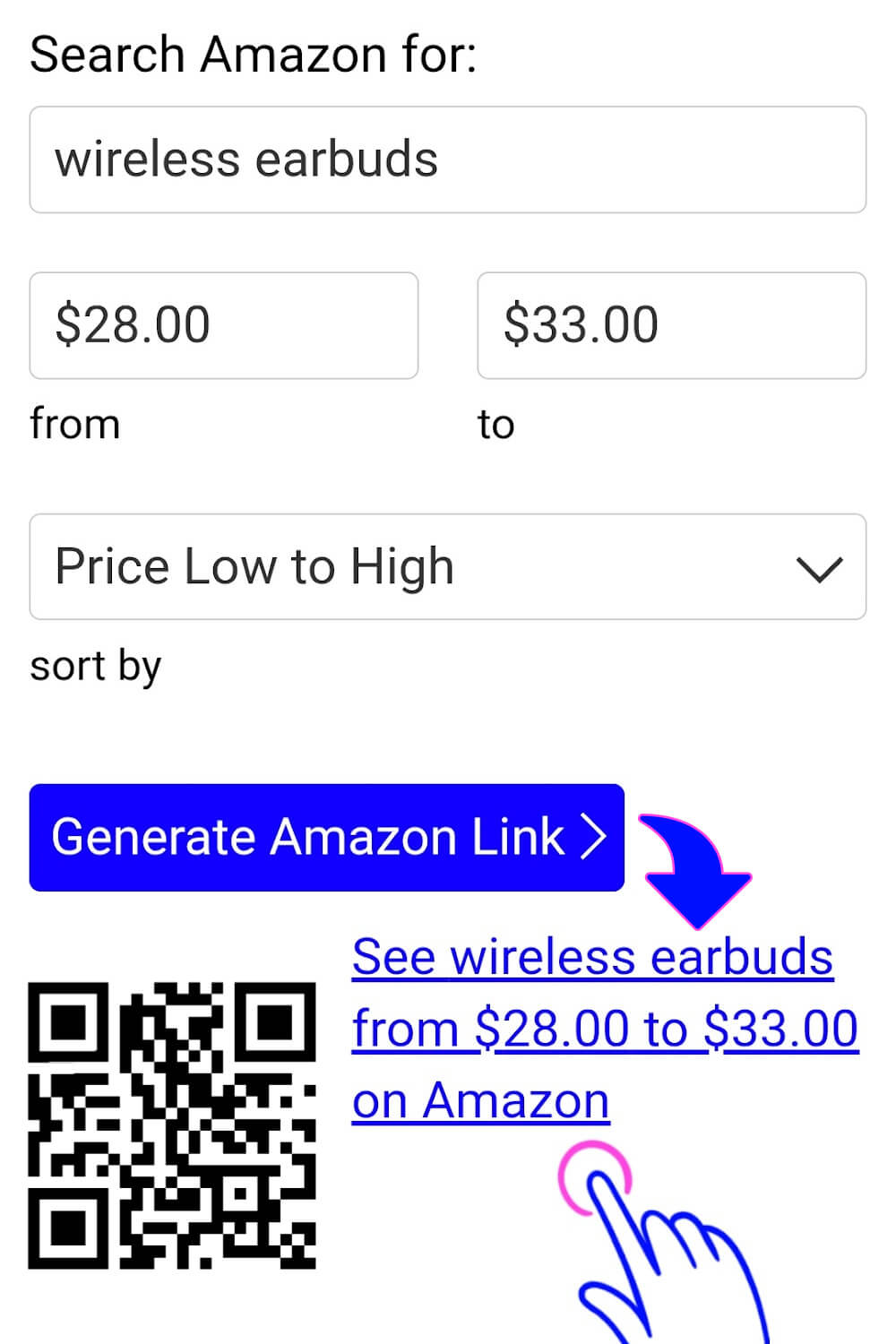

Finding products within your budget doesn't have to be difficult. Instead of browsing through countless listings across every price point, you can create a custom Amazon search based on the product you want and the amount you're willing to spend.
Whether you're shopping for electronics, home improvement items, clothing, tools, kitchen appliances, gifts, pet supplies, automotive accessories, books, or any other product sold on Amazon, this custom search helps you focus on products that match your budget from the very beginning.
Try different products, keywords, brands, and price ranges to compare your options and discover better values. A few small adjustments can often reveal products you might not have found otherwise.
Whenever you're ready, enter the product you're looking for, choose your own minimum and maximum prices, generate your custom Amazon search link, and start exploring Amazon results tailored to your budget.
Disclosure: iKnowThatSite.com is a participant in the Amazon Services LLC Associates Program, an affiliate advertising program designed to provide a means for websites to earn advertising fees by advertising and linking to Amazon. As an Amazon Associate, this website earns from qualifying purchases. This does not affect the price you pay.
Last Updated: July 2026
Bookmark this page and come back whenever you want to create another custom Amazon search using your own minimum and maximum prices.